
Klar-ID makes a suggestion. You decide.
The AI assistant in Klar-ID suggests a possible cause during diagnosis – with a rationale and a source. You accept it, change it, or dictate your own.
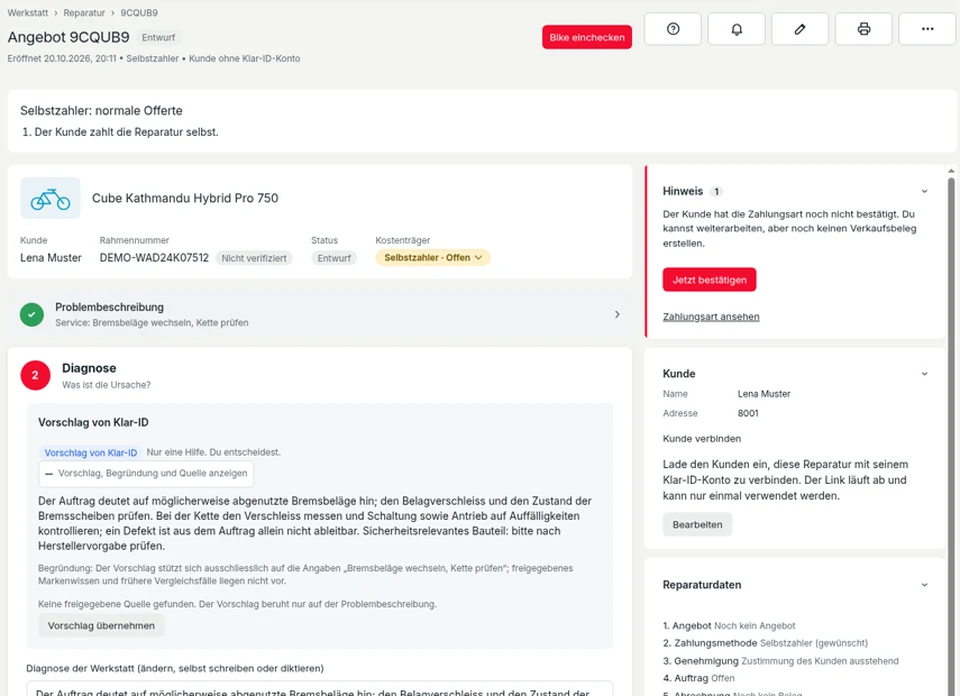
For workshops and retailers with a workshop: in the “Diagnosis” step of a repair, Klar-ID suggests a possible cause. The suggestion is only a help – the diagnosis is made by your workshop.
At a glance
Suggestion from Klar-ID
A possible cause directly in the “Diagnosis” step, marked with “Only a help. You decide.”
Transparent
Every suggestion comes with a rationale and a note on the source.
You decide
Accept the suggestion, change it, write it yourself or dictate it.
Safety first
Safety-relevant parts are flagged – please check them according to the manufacturer’s instructions.
How it works
- Open the repair: In the order, go to the “Diagnosis” step.
- Review the suggestion: Under “Show suggestion, rationale and source” you see what the suggestion is based on.
- Decide: With “Accept suggestion” the text is placed in “Workshop diagnosis”. There you change it, write it yourself or dictate it by voice.
- Share if you want: With “Customer can read this diagnosis” you decide whether the customer sees the diagnosis.
Features in detail
- Suggestion: A possible cause and what to check, based on the information in the order.
- Rationale: Shows which details the suggestion is based on.
- Source note: Names an approved source, brand knowledge or earlier comparable cases. If there is none, that is stated clearly.
- Safety note: Safety-relevant parts are named in the suggestion, with the note to check them according to the manufacturer’s instructions.
- Accept suggestion: Copies the suggestion into “Workshop diagnosis”, where you can edit it freely.
- Dictate by voice: Speak the workshop diagnosis instead of typing it.
- Get a new suggestion: Request a new suggestion.
- When no suggestion appears: Not every order has a suggestion. Then you make the diagnosis yourself as usual.
- Customer can read this diagnosis: With a checkbox you decide whether the customer sees the diagnosis.
- Talk to Klar-ID: The “Talk to Klar-ID” bar sits at the top of the workshop view.
Frequently asked questions
Does Klar-ID make the diagnosis?
No. In the “Diagnosis” step of a repair, Klar-ID suggests a possible cause, marked with “Only a help. You decide.” You write the workshop diagnosis: with “Accept suggestion” you copy the text into “Workshop diagnosis” and change it there, or you write or dictate the diagnosis entirely yourself. Safety-relevant parts are named in the suggestion, with the note to check them according to the manufacturer’s instructions. Not every order has a suggestion.
How do I know what the suggestion is based on?
Under “Show suggestion, rationale and source” you see which details in the order the suggestion is based on. The source note names an approved source, brand knowledge or earlier comparable cases. If there is no approved source, that is stated clearly there. So you can assess the suggestion before you accept it, change it or request a new one.
Can the customer see the suggestion?
Only if you want them to. The customer sees the diagnosis only if you tick “Customer can read this diagnosis”. What is shared is the workshop diagnosis, that is the text you accepted, changed or wrote yourself. Without the tick, everything stays internal to your team. So you decide for each order what the customer can read.
Related features
Get started with Klar-ID
You register yourself in the Klar-ID app. Get started, view packages and prices or get in touch for a demo.
Want to find out more or talk to us?
Drop us a line.