
Manage workshop orders simply and transparently.
Workshop orders in Klar-ID: check-in, quote, repair and completion in one order – with customer and bike data, parts and work status.
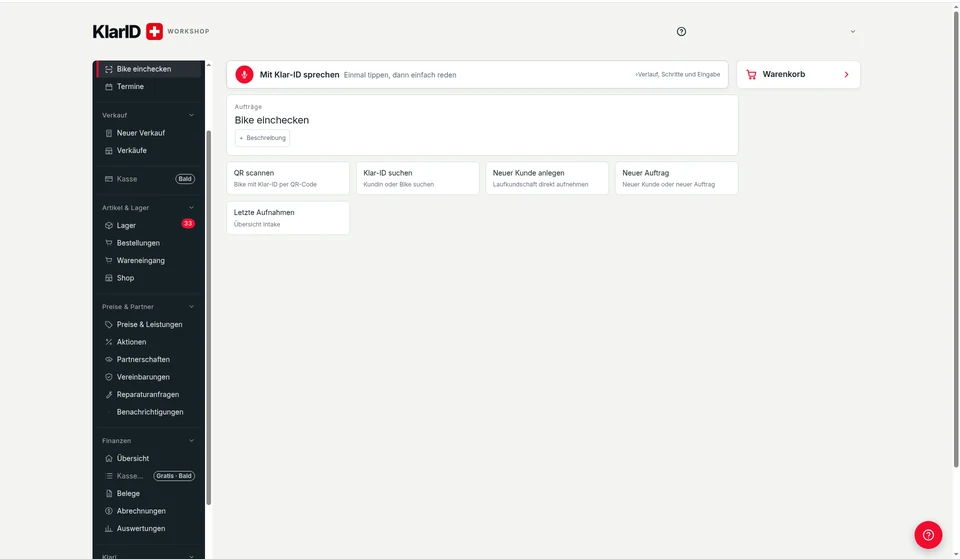
Workshop software for bicycle workshops: taking in repairs, looking after customers, identifying bikes and working through orders – a lot of information has to fit together. For bikeshops with a workshop: an order in Klar-ID brings together the customer, the bike, the work, the spare parts and the work status – from check-in through to collection.
At a glance
Fast check-in
Record the customer and the bike once, and find them again on the next order.
Everything in the order
Work, parts and the history in one place.
Work status for everyone
“In progress”, “Waiting for part” or “Clarification” at a glance.
Keep customers informed
Notify them when the bike is ready for collection.
How it works
- Check-in: Record the customer and the bike on the order and note the request.
- Quote: Put work and parts together and give the customer an offer to approve.
- Repair: Carry out the work, use parts from stock or order them, and keep the work status up to date.
- Completion: Notify the customer, complete the order at collection; the work stays in the bike’s service history.
Features in detail
- Bike check-in: Record a new bike or find it again from existing bike data.
- Creating an order: A new order with customer, bike and request.
- Customer and bike data: Visible on the order, without being entered again.
- Work and parts: Work steps and the spare parts needed, on the order.
- Work status: If a part is expected, the order shows “Waiting for part”; the team can also set the status themselves.
- Completion and history: Completed work stays linked to the bike.
So läuft ein Werkstattauftrag
Von der Annahme bis zur Abrechnung – ein Werkstattauftrag in Klar ID. Alle Daten im Film sind Demo-Daten.
Frequently asked questions
Do I have to enter customer and bike data again for every order?
No. You link a new order to an existing customer and bike; the data appears on the order without being entered again. You record a new bike once at the first check-in, with brand, model and frame number. At the next visit you find it again with search and see in the service history what was done last time. That saves time at the counter and avoids typing mistakes.
How do I see which orders are waiting for parts?
As long as needed parts have not arrived, the order shows the status “Waiting for part”. So you see at a glance which bikes are ready and which are waiting. Other statuses include “In progress” or “Clarification”; your team can also set the status themselves. You order missing parts via the basket, and after goods inward, stock and orders are up to date at once.
Can the customer approve the quote?
Yes. In the workshop order you put work and parts together, and the customer receives an offer to approve. If something changes during the repair, for example extra costs beyond the agreed limit, the customer can approve or decline that change before you continue. So the customer knows what to expect, and there is no surprise at collection. From the same order you then create the invoice.
What happens after completion?
The completed work stays linked to the bike and is visible in the service history on the next order. Before completion you notify the customer that the bike is ready for collection; at collection you complete the order. From the order you create the invoice without entering work and parts again, and you record the payment. Income then appears in the cash book.
Can I order missing parts directly from the job?
Yes. You order missing parts via the shopping basket, and after goods receipt the stock and the jobs are up to date immediately. Labour, parts and the history stay in one place in the job.
Is the customer notified when the bike is ready for collection?
Yes. Before you close the job you notify the customer that the bike is ready for collection; you close the job at collection. The completed work stays linked to the bike and is visible in the service history at the next job.
Related features
Get started with Klar-ID
You register yourself in the Klar-ID app. Get started, view packages and prices or get in touch for a demo.
Want to find out more or talk to us?
Drop us a line.